Flying a drone in Belgium is no longer a matter of “just taking off”. Whether you fly recreationally or carry out professional missions for inspections, construction sites or real estate, proper preparation is essential. Ignoring the rules can lead not only to fines, but also to your flight being stopped on site.
In this article, we explain step by step how to:
- check whether you are allowed to fly at a specific location
- determine whether an official request is required
- correctly submit a flight via the Drone Service Application (DSA)
- know what to do on the day of the flight
This article builds on our earlier explanation of GeoZones and drone legislation in Belgium.
That basic knowledge remains important and can be read here:
https://www.droneview.be/en/stricter-drone-control-in-europe-how-to-check-where-you-can-fly-in-belgium/
Step 1: First check where you are allowed to fly – Droneguide
Every drone flight starts with one simple question: am I allowed to fly here?
The official map for this is the Droneguide map from skeyes.
Go to: https://map.droneguide.be
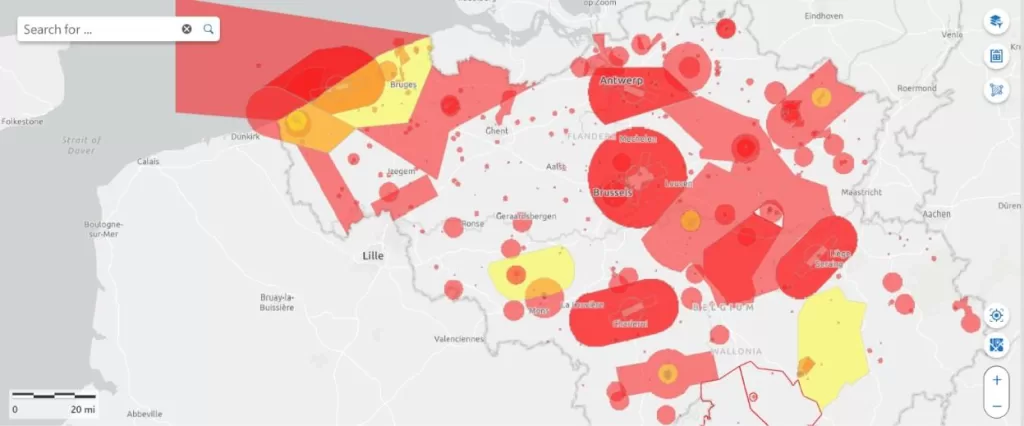
On this map, you can immediately see:
- prohibited zones (no-fly zones)
- warning zones
- zones with specific conditions (such as around airports, industry, ports or military areas)
Zoom in on your planned location and click on the zone. You will immediately receive additional information about:
- the type of GeoZone
- who manages the zone
- whether an authorisation is required
Important to remember:
The Droneguide map is an information tool.
It tells you whether flying is allowed, but it does not grant permission.
If you see that your location is in a GeoZone managed by skeyes (such as VLL zones around airports), a request via the DSA is mandatory.
Step 2: When do you need the DSA Planner?
Continue reading “Planning and requesting drone flights in Belgium: The Complete Guide”
 also performs well in challenging weather conditions: rain, wind, cold – the M210 keeps flying.
 Preparation: clarity from the start